
Streamline Your Workflow
Internal Ticketing in Microsoft Teams: Go Live in a Week
Discover the seamless integration of internal ticketing systems within Microsoft Teams, designed to enhance collaboration and streamline your workflow. Transform your team’s efficiency with our easy-to-implement solution.
Effortless Integration
Integrate your ticketing system effortlessly within Microsoft Teams to enhance productivity and streamline communication.
Boost Collaboration
Facilitate better team collaboration with a unified platform that centralizes all your ticketing needs.
Quick Implementation
Implement your internal ticketing system swiftly, ensuring minimal disruption and maximum efficiency.
Why the barrier to structured internal requests has collapsed — and what a disciplined five-day rollout actually looks like.
The question underneath the question
Ask an operations director why their company still routes leave requests, invoice approvals and IT access through email, and you will usually hear some version of the same answer: ticketing sounds like an IT project, and IT projects take six months. That assumption was reasonable a decade ago. It no longer is.
Microsoft Teams has passed 320 million monthly active users — the last official figure Microsoft published, in its FY24 Q1 earnings — and it is already where your employees chat, meet and share files. Ticketing has followed the work there: modern tools install from the Teams Store, require no code, and are configured by an HR or finance lead rather than a development team. The barrier was never technology; it was the mental model of what an implementation looks like.
So the direct answer is this: you choose an internal ticketing system by testing how natively it lives inside Teams, how little code it demands, and how honestly it reports on your processes — and you implement it in one week by piloting a single process with a single team, not by boiling the ocean. The rest of this article shows you how, with the evidence, the selection framework and the pitfalls.
Why now: the real cost of informal request handling
Knowledge workers spend roughly 28 per cent of the working week on email — about 11 to 12 hours, per aggregated workplace studies from 2025. Much of that is not communication but coordination: chasing approvals, resending attachments, asking “did you see my message?” None of it is measurable, because email keeps no queue, no SLA and no audit trail. When a manager asks why an invoice took nine days to approve, the honest answer is usually that nobody knows.
Microsoft’s 2025 Work Trend Index, a survey of 31,000 workers across 31 markets, adds a second pressure: 75 per cent of knowledge workers already use AI at work, and leaders increasingly expect technology to expand capacity rather than headcount. Tools that merely move chaos from inbox to chat will not satisfy that expectation. Structured ticketing — queues, timers, roles, analytics — is the plumbing that makes every fancier automation credible.
There is also a structural shift. Microsoft’s 2026 Teams roadmap brings slash commands for apps, deeper Copilot integration, and admin tooling that scores third-party applications on trust signals. Teams is becoming a platform, and the applications living natively inside it are the path of least resistance for your staff — precisely where internal requests belong.
What “native in Teams” should actually mean
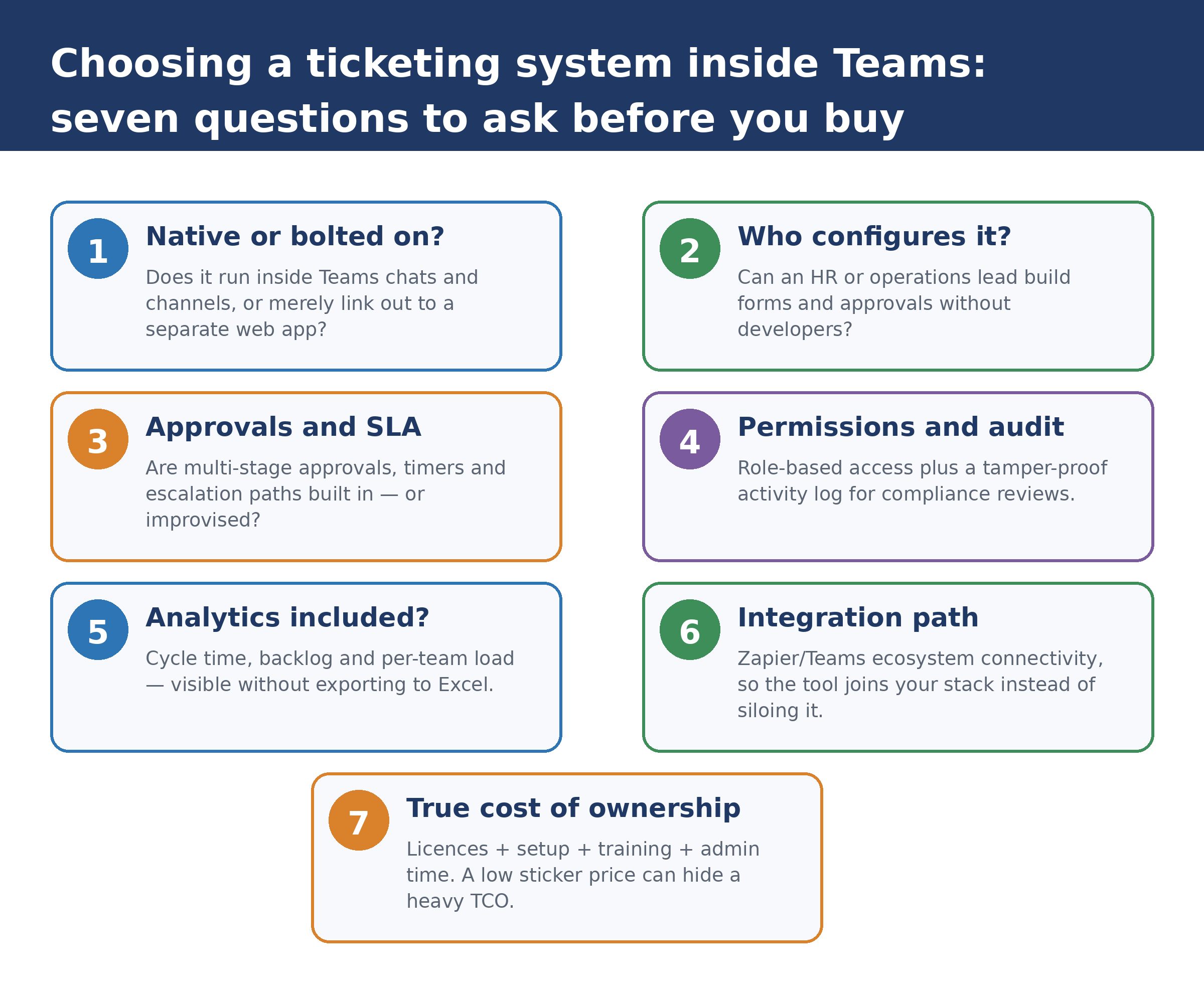
Vendors use the phrase loosely, so inspect it before you shortlist anything. A genuinely native ticketing system shares Teams’ interface rather than merely linking out to a browser tab. In practice, you should expect all of the following:
- Requests are submitted and tracked from Teams chats and channels, under the same identities your staff already hold.
- Templates, forms and multi-stage approvals are configurable without code, ideally from a visual builder an operations person can master in an afternoon.
- Seven field types or more — text, tables, checklists, dates and so on — so forms capture structure instead of free prose.
- Role-based permissions and a tamper-proof activity log provide the audit trail that email never could.
- Built-in analytics expose cycle time, backlog and per-team load without exporting anything to Excel.
- Connectivity to the rest of your stack — for instance through Zapier’s ecosystem of over a thousand integrations — so the tool joins your processes instead of creating another silo.
FlowDocs is built to this specification: an internal ticketing platform installed from the Teams Store, with vendor-reported onboarding measured in minutes rather than project phases. The company reports that teams typically cut approval cycle time by up to 60 per cent and reduce administrative workload by up to 80 per cent. Treat those as vendor claims to be verified against your own pilot data — which, conveniently, the five-day plan below is designed to produce.
Three ways to run internal requests, compared
|
Criterion |
Email and chat threads |
Spreadsheets and shared drives |
Teams-native ticketing |
|
Structure |
Free-form; context buried in threads |
Rows without workflow logic |
Tickets with fields, stages and owners |
|
Accountability |
“Did you see my email?” |
Manual status chasing |
SLA timers and automatic escalation |
|
Audit trail |
Fragmented across inboxes |
Version history at best |
Tamper-proof activity log per ticket |
|
Analytics |
None |
Manual pivot tables |
Cycle time and backlog dashboards |
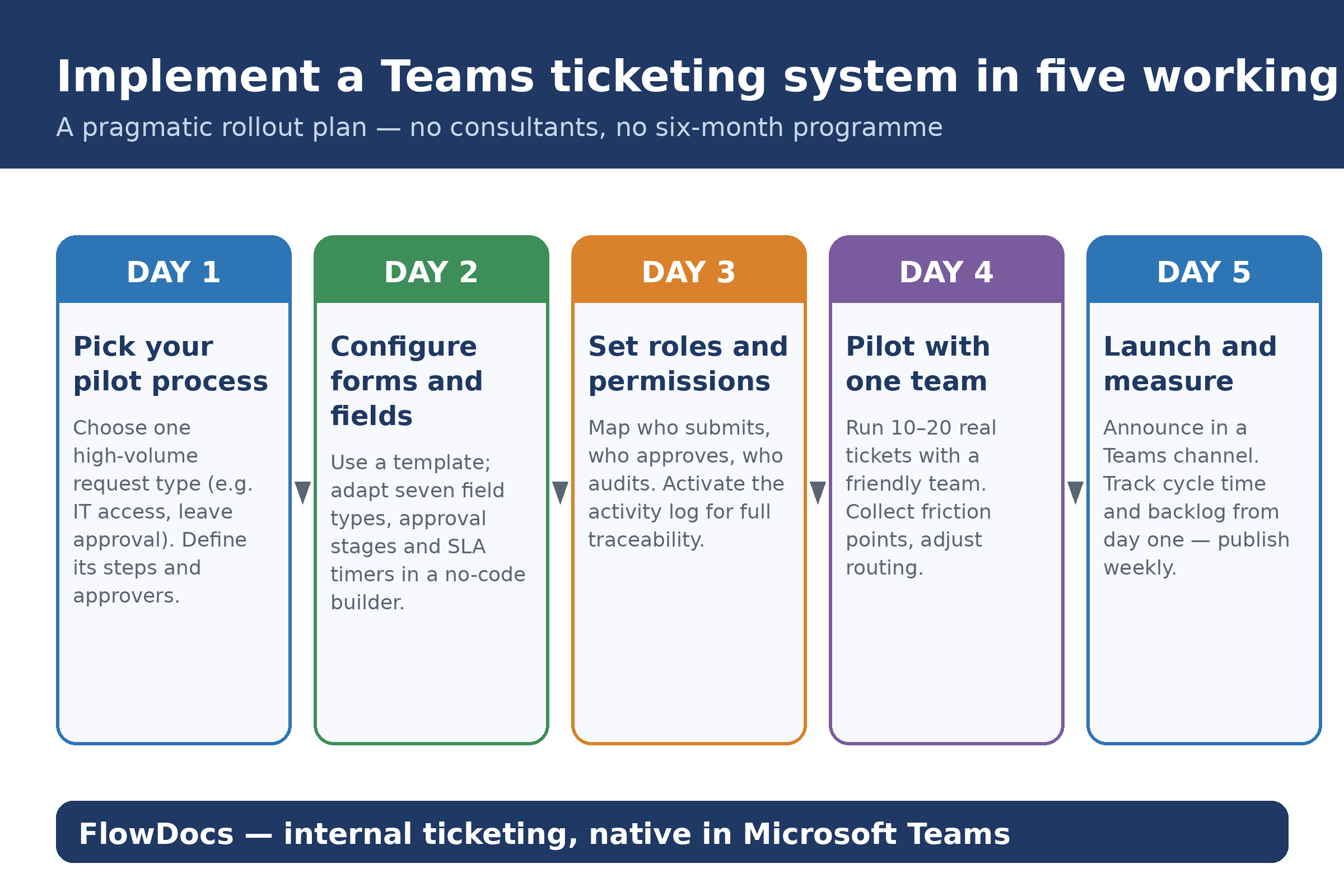
Fig. 1 — Five-day implementation plan for a Teams-native ticketing system (see figure below).
The five-day rollout: small, real, measured
Days 1–2: one process, configured for real
Choose a single high-volume request type — IT access, leave approval or invoice sign-off — and map its steps on one page. Resist the urge to document everything; one process, described honestly, teaches you more than ten processes described aspirationally. Then configure it: adapt a template, set the field types you actually need, define the approval stages and attach an SLA timer. If this takes more than two days, the tool is wrong, not the plan.
Days 3–4: permissions and an honest pilot
Assign roles — who submits, who approves, who audits — and switch on the activity log before anyone submits a ticket. Then pilot with one friendly team and ten to twenty real requests, not synthetic test data. The pilot’s job is not to prove the system works; it is to surface friction while the stakes are low. Adjust routing, field wording and notification thresholds based on what you actually observe, not what the vendor’s demo suggested.
Day 5: launch and publish numbers
Announce the workflow in a Teams channel and publish two numbers every week thereafter: average cycle time and open backlog. These two metrics will tell you within a month whether the system is earning its place — and they give you an evidence base when colleagues from other departments ask to onboard their own processes. Resist expanding scope until both numbers have been stable for two consecutive weeks.
Precedent: speed is not the enemy of rigour
Sceptics will call a five-day rollout reckless. The published record disagrees. During the first wave of the pandemic, the Royal Free London NHS Foundation Trust implemented Microsoft Teams across the organisation within two weeks — documented in a case study indexed by the National Library of Medicine — and passed 500 daily active users within 11 days. If a hospital trust can stand up a mission-critical collaboration platform in a fortnight under existential pressure, a single internal approval workflow inside a business week is conservative, not radical.
The lesson generalises: implementation risk scales with scope, not speed. A narrow pilot with real users is safer than a broad programme built on imagined requirements — and it produces evidence instead of slide decks.
Frequently asked questions
Do we need developers or an IT project team to set this up?
No. A Teams-native, no-code tool is configured by the process owner — typically an HR, finance or operations lead. IT merely approves the app from the Teams Store and reviews permissions.
Won’t staff resist yet another system?
If the system lives where staff already work — inside Teams — adoption is usually fast. The five-day plan pilots with one friendly team first, so sceptics see results before a wider launch.
What happens to our existing email approvals?
Run both in parallel for two weeks, then route new requests exclusively through tickets. Email remains a notification layer; it stops being the workflow layer. Historical approvals stay searchable in the archive.
How do we justify the cost to management?
Measure cycle time and backlog in the pilot, convert hours saved into money, and compare total cost of ownership — licences, setup, training, admin — against the measurable email overhead.
Is our data safe with a third-party Teams app?
Review role-based access, encryption, audit logs and data residency. Microsoft’s admin tooling now surfaces trust signals for third-party Teams apps — precisely the assessment IT should run before approval.
The conclusion, in one sentence
Choose the tool that disappears into Teams, launch it on one process in five days, and let two weekly numbers — cycle time and backlog — make the case for you.
Key Features of Our Ticketing System
Our internal ticketing system seamlessly integrates with Microsoft Teams, providing a streamlined experience for managing and resolving issues efficiently.
01
Seamless Integration
02
Automated Workflows
03
Real-Time Collaboration
04
Comprehensive Reporting
Ready to Transform Your Workflow?
Discover how our ticketing system can enhance your team’s efficiency and collaboration. Sign up for a personalized demo or consultation today and take the first step towards a more organized and productive work environment.