
Transform Collaboration with Seamless Workflow Integration
Flowdocs Overview: Transforming Workflows and Ticket Management
Unlock the potential of your team by integrating no-code workflows directly into Microsoft Teams, enhancing productivity and collaboration.
Understanding the Process
Overview
Flowdocs is a Workflow and Ticket system that seamlessly routes and tracks multi-step approval workflows for organizations, using powerful form building tools to create digital PDF-like forms. This page is only a high level summary, and more detailed documentation can be found in the left hand menu.
Initiate Ticket Submission
Tickets are initiated through carefully crafted forms referred to as Templates, which serve as the foundation for collecting necessary data. These templates offer substantial customization capabilities, enabling organizations to fine-tune forms to align perfectly with their unique requirements. Among the many configurable attributes are:
- Input Types: A variety of input methods, ranging from basic text boxes and checkboxes to advanced select menus and conditional fields.
- Visual Layout Controls: Intuitive interfaces allow for easy adjustment of element placement and styling.
- Conditional Logic: Certain fields can be hidden or displayed based on specific criteria, enhancing form logic and user experience.
After submission, each ticket adheres to a predefined workflow sequence, commencing with the first step specified in the template configuration. Immediately after submission, an automated bot notifies the designated user or user group responsible for executing the initial step, thus ensuring a rapid commencement of the approval procedure.
Tracking Tickets
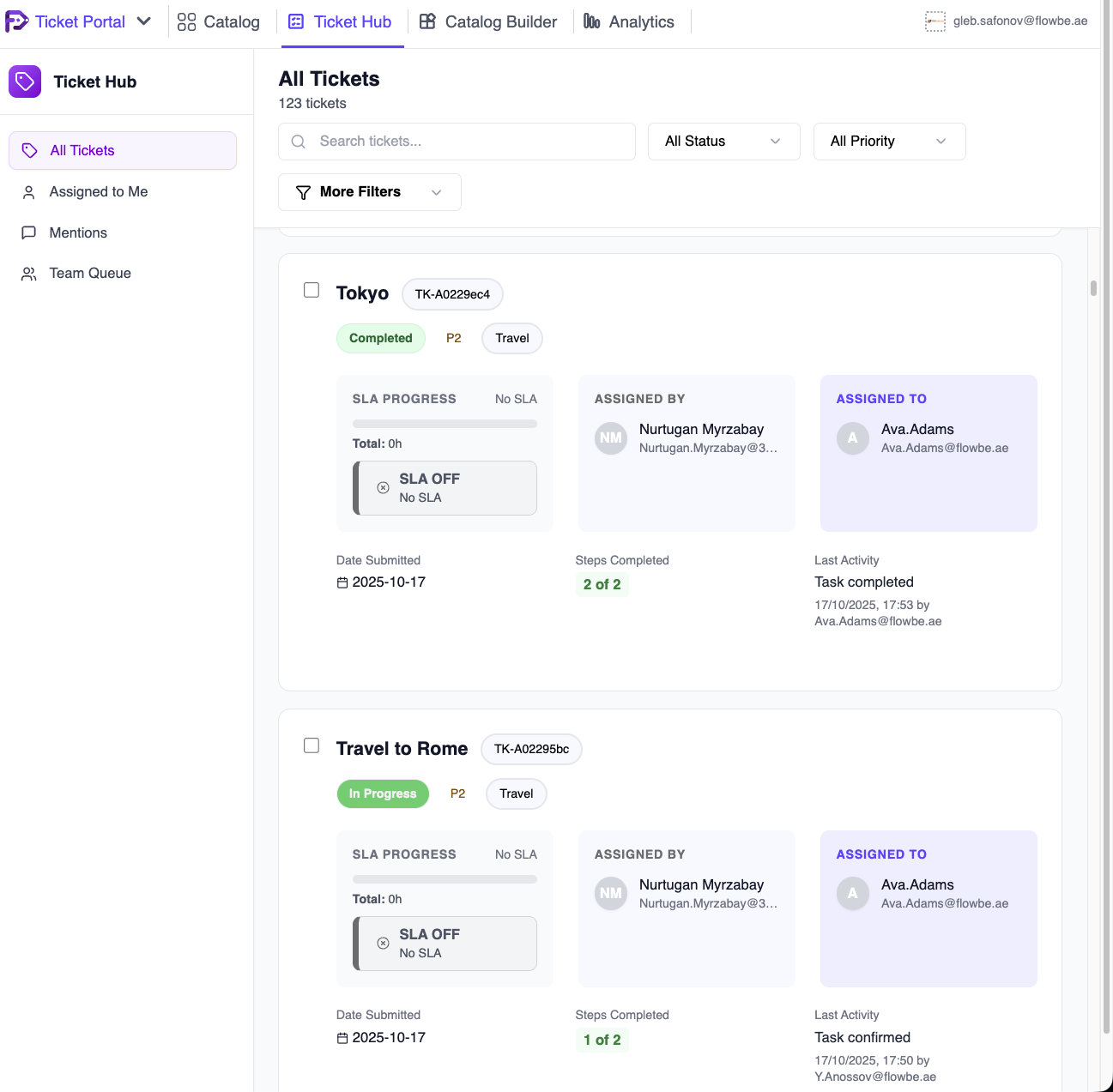
Monitoring and managing tickets occur within the Ticket Hub, acting as the central repository for both ongoing and completed tickets. This centralized location provides extensive customization options, empowering users to tailor the presentation of relevant data and tickets to match particular use cases. Through the Ticket Hub, users can organize and filter tickets based on priorities, statuses, or assignments, fostering efficient workflow orchestration.
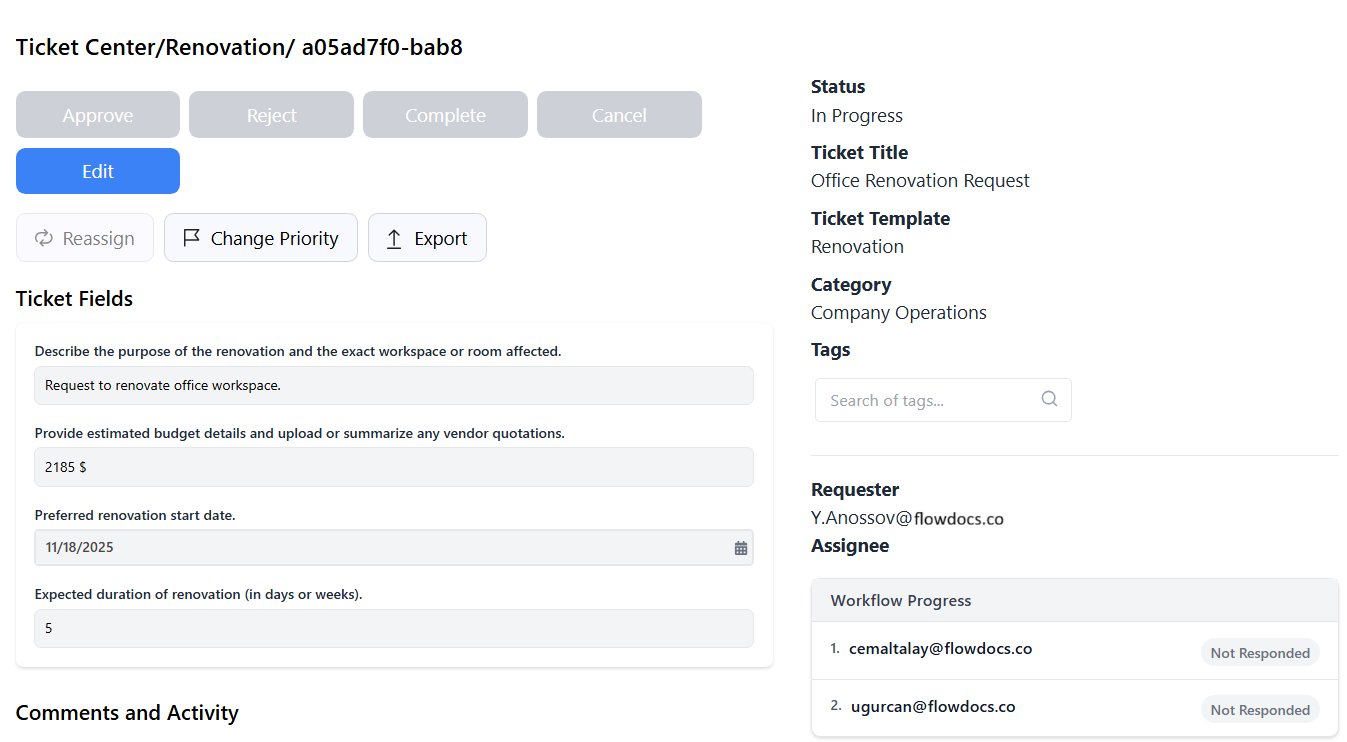
Every individual ticket is fully managed within the Ticket Details Page, containing a wealth of essential information:
- Workflow Status: Offers insights into the current step, number of completed steps, and the duration of each step.
- Filled-out Form Reference: Provides access to the original form as submitted by the user, facilitating contextual understanding of the ticket.
- SLA Status: Keeps track of compliance with Service Level Agreements, helping maintain strict timelines.
- Activity Log: Captures a comprehensive record of all events related to the ticket, alongside any appended comments, ensuring full traceability.
- Actionable Items: Empowers users to advance workflows by approving steps, marking tickets as complete or rejecting them, exporting data to formats like DOCX, XLSX, or PDF, and performing additional administrative actions.
Leveraging Flowdocs for Maximum Impact
Flowdocs’ form-building tools and ticket management features are geared towards enhancing operational efficiency and minimizing reliance on manual interventions. Let’s delve deeper into two key aspects:
Enhancing Operational Efficiency
- Reduced Errors: Standardized forms eliminate inconsistencies, lowering error rates and saving time spent on corrections.
- Streamlined Approval Processes: Clearly defined workflows speed up decision-making, eliminating unnecessary delays.
- Improved Accountability: Clear audit trails foster responsibility and transparency, encouraging better governance.
Promoting Seamless Collaboration
- Cross-Departmental Harmony: Uniform ticket management platforms encourage cohesive collaboration across divisions.
- Transparency in Decision Making: Real-time ticket tracking gives stakeholders immediate visibility into the status of critical tasks.
- Scalability: The platform scales effortlessly to accommodate growing volumes of tickets, maintaining peak performance regardless of size.
Embrace Flowdocs as your strategic partner in navigating the intricate world of workflows and ticket management. Together, let’s build smarter, leaner, and more responsive organizations ready to tackle tomorrow’s challenges.
Integrate FlowDocs with Microsoft Teams
Create Workflows Without Code
1
Connect Your Teams
Begin by linking FlowDocs to your Microsoft Teams account to access all your collaborative tools in one place.
2
Design Your Workflow
Use our intuitive interface to drag and drop elements, creating custom workflows tailored to your needs.
3
Launch and Collaborate
Deploy your workflows with a click and watch your team collaborate more effectively than ever before.
See FlowDocs in Action
Watch our video to discover how FlowDocs enhances team collaboration and simplifies workflow management with its intuitive, no-code platform.
Experience FlowDocs Today
Unlock the full potential of your team with FlowDocs. Sign up now for a free trial and see how easy it is to streamline your processes and boost productivity.