14 September 2026FlowDocs
NEW FEATURE: Premade Templates — a Ready-Made Process Library Inside FlowDocs
Streamline Your Workflow Effortlessly
Introducing Premade Templates in FlowDocs
Discover how our new premade templates can revolutionize your workflow by providing ready-made processes that integrate seamlessly into your existing systems.
Unlock New Possibilities
Key Features of Premade Templates
Instant Deployment
Deploy workflows instantly with our pre-designed templates, minimizing setup time and maximizing productivity.
Easy Customization
Tailor each template to fit your unique business needs without any coding required.
Enhanced Collaboration
Facilitate better team collaboration with templates designed for seamless communication and task management.
Integrated Solutions
Our templates work effortlessly within Microsoft Teams, ensuring a smooth integration into your existing workflow.
Scalable Processes
Adapt templates to grow with your business, ensuring long-term efficiency and scalability.
User-Friendly Interface
Navigate and implement templates easily with our intuitive user interface designed for all skill levels.
Ready-Made Process Library Inside FlowDocs
Why we built a template catalog, what ships in it today, and how it turns a blank page into a working workflow in minutes.
The hardest part of automating an internal process has never been the automation itself. It is the blank page: deciding what fields the form needs, which approvals the process requires, who should see what. Most teams stall there — not because the tooling is difficult, but because designing a process from nothing feels like a project. It isn’t. It never should have been.
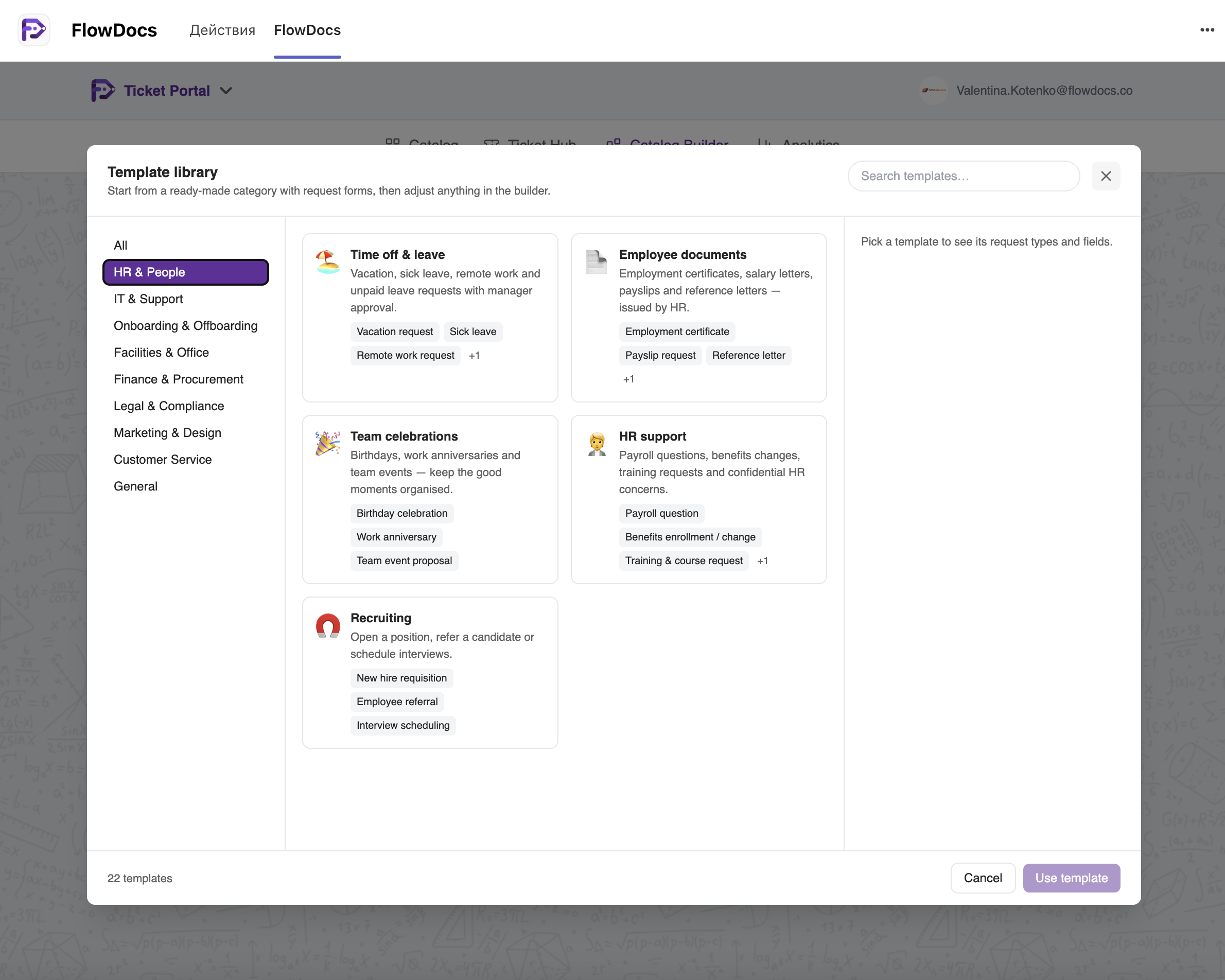
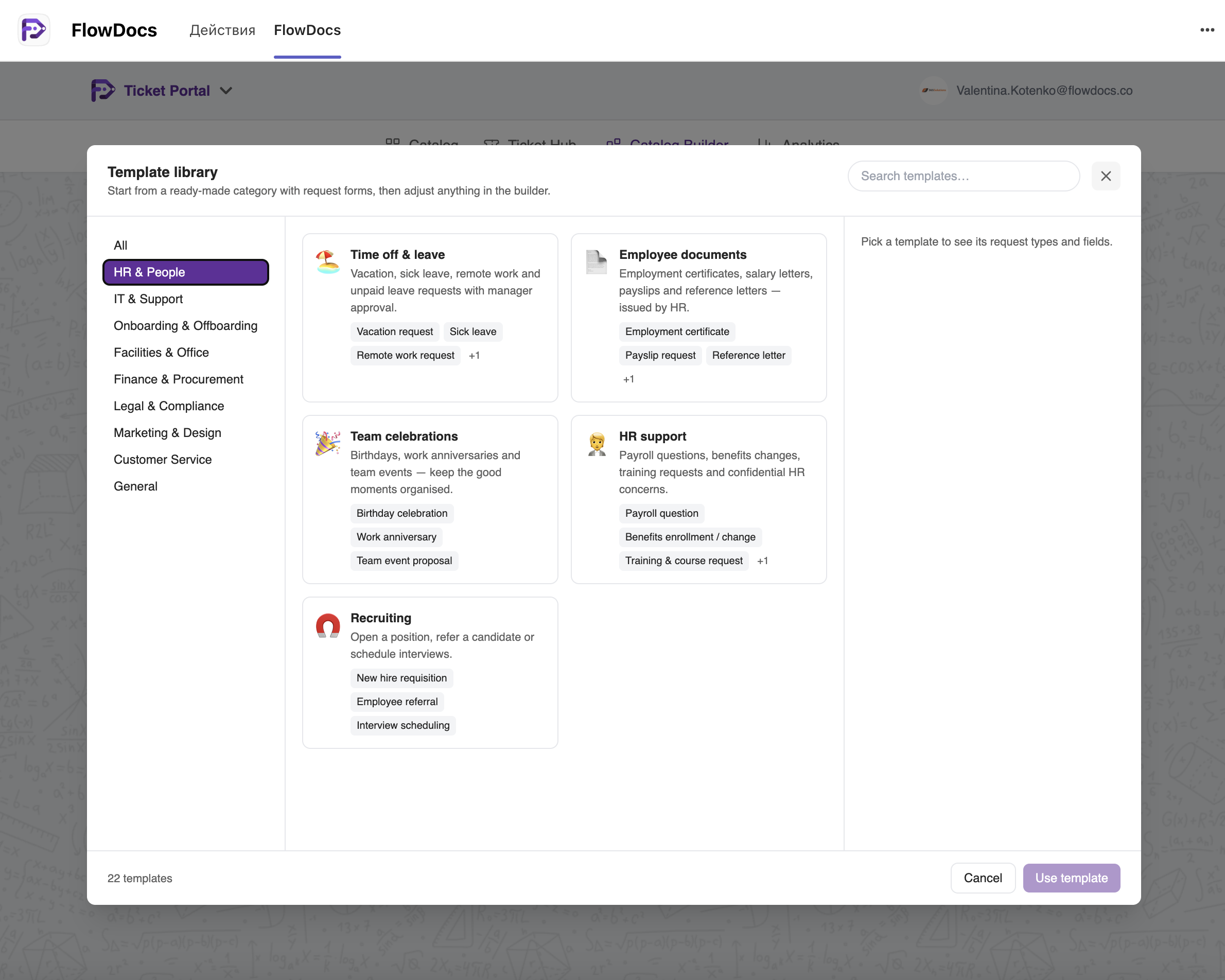
With this release, it no longer is. FlowDocs now ships with Premade Templates: a built-in library of ready-made process categories, each pre-configured with request forms, field sets and request types you can deploy as-is — or adjust freely in the builder.
What is in the catalog today
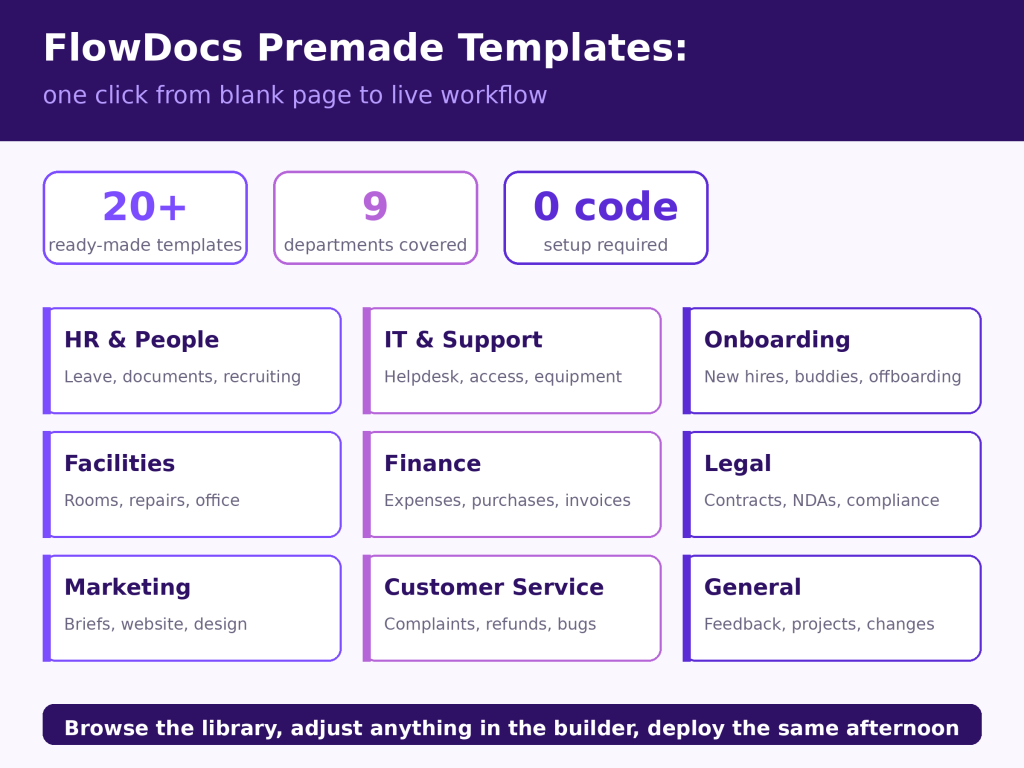
The library launches with 20+ templates across nine departments, covering the processes that generate the most internal traffic in almost every organisation:
HR & People — Time off & leave, Employee documents, Team celebrations, HR support, Recruiting
IT & Support — Helpdesk incidents, Software installation, Security & access, Equipment and new device requests
Onboarding & Offboarding — New employee onboarding, Buddy & first-week plans, Equipment requests, Offboarding with access removal
Facilities & Office — Office helpdesk, Meeting room booking, Maintenance and repair
Finance & Procurement — Expenses & reimbursements, Purchase requests, Corporate cards, Invoice approvals
Legal & Compliance — Legal requests, Contract review, NDAs, Policy exceptions, Confidential reports
Marketing & Design — Creative & marketing briefs, Website & digital requests
Customer Service — Customer support requests, Complaints and refunds
General — Catch-all requests, Feedback and suggestions, Project initiation and change requests
Each template comes with structured request types — a “Time off & leave” category, for example, includes vacation requests, sick leave and remote work — each with the relevant fields already defined. The Project initiation template arrives with seven fields (project name, objective, sponsor, target dates, budget, teams involved); others carry five or fewer, keeping forms short enough that people actually complete them.
Why templates matter more than they sound
Three practical reasons:
Speed stops being the excuse. Selecting a category takes one click; adjusting it in the builder takes minutes. The distance between “we should automate this” and “this is live” collapses from weeks to an afternoon — the same principle behind our two-minute onboarding, now extended to the process design itself.
Good process design becomes the default. Templates encode sensible structure — required fields, right-sized forms, sensible priorities — so a team new to workflow automation starts from a solid pattern rather than reinventing one, usually worse.
The catalog will keep growing. This release is a foundation, not a ceiling. We will expand the library with new categories and request types based on what FlowDocs teams actually run — and customers can shape that roadmap directly through the feedback panel.
How to try it
Open the Template library from the Catalog, pick a category, and inspect its request types and fields before committing. Everything remains editable: rename fields, add approval stages, set SLAs. You’ll be the default assignee for the request types you deploy — change that anytime in each template’s settings.
Your first templated workflow can be live today. Install FlowDocs from the Teams Store if you haven’t already, open the Template library, and start with the one process your team complains about most.
Getting Started with Premade Templates
Step 1
Step 1: Select a template from our extensive library that best fits your workflow needs.
Step 2
Step 2: Customize the template to align with your specific processes and team requirements.
Step 3
Step 3: Deploy the template within Microsoft Teams and start collaborating with your team instantly.